
How to Install MyLynq Chrome Extension (Step-by-Step Guide)
Download MyLynq Smart URL & Deep Link Generator
Convert any URL into a mobile app opener link with 1 click. Zero-login auto sync, instant branded QR codes, and right-click smart routing.
Install Time
60 Seconds
Cost
100% Free
Browser Support
All Chromium
Permissions
Safe / ActiveTab
Download & Extract the ZIP File
First, click the green button above to download mylynq-extension.zip. Once downloaded, locate the file in your Downloads folder and Unzip (Extract) it:
mylynq-extension.zip ➔ Select "Extract All..." ➔ Click Extract.mylynq-extension.zip. Archive Utility will instantly create the extracted folder.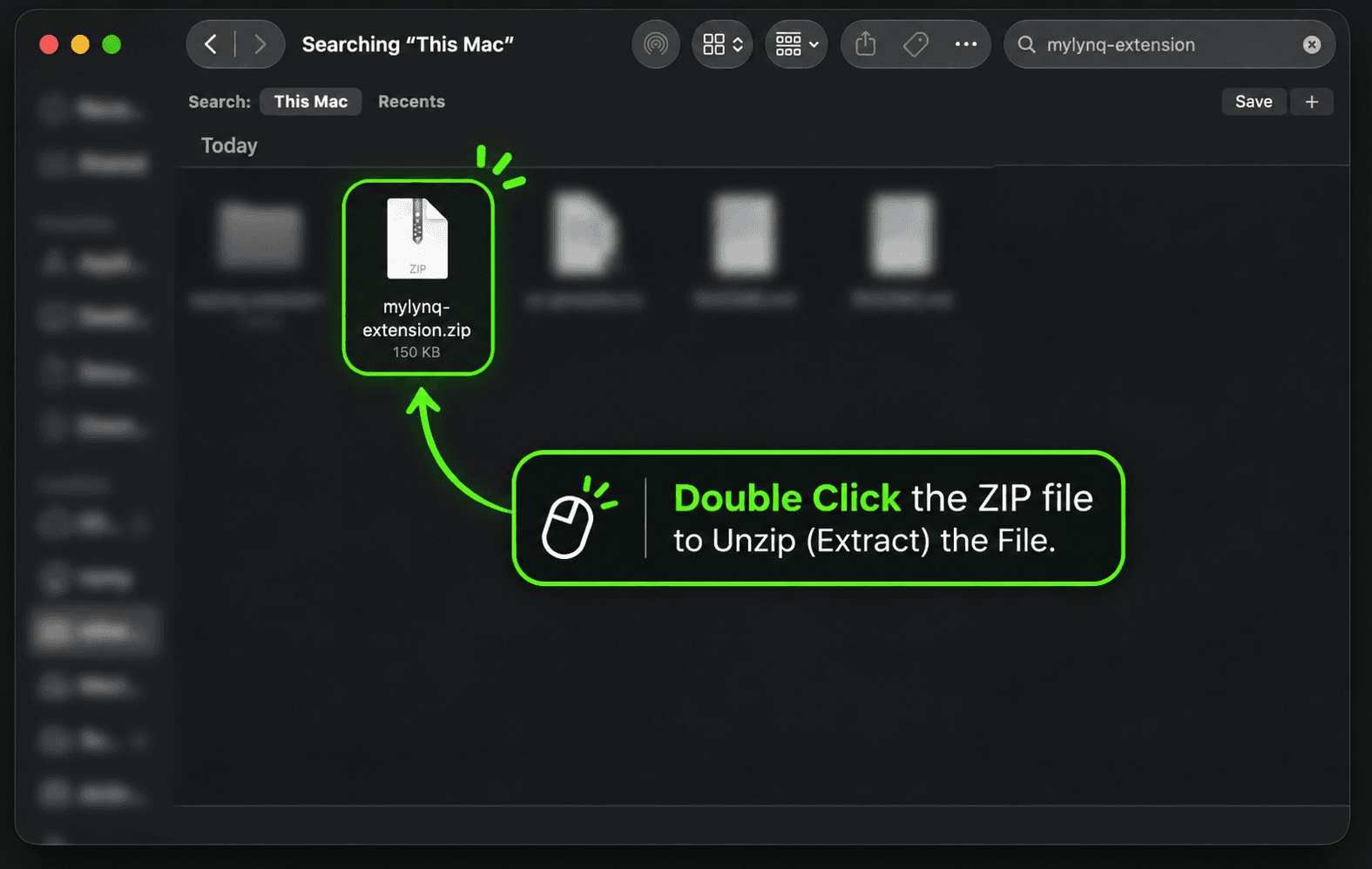
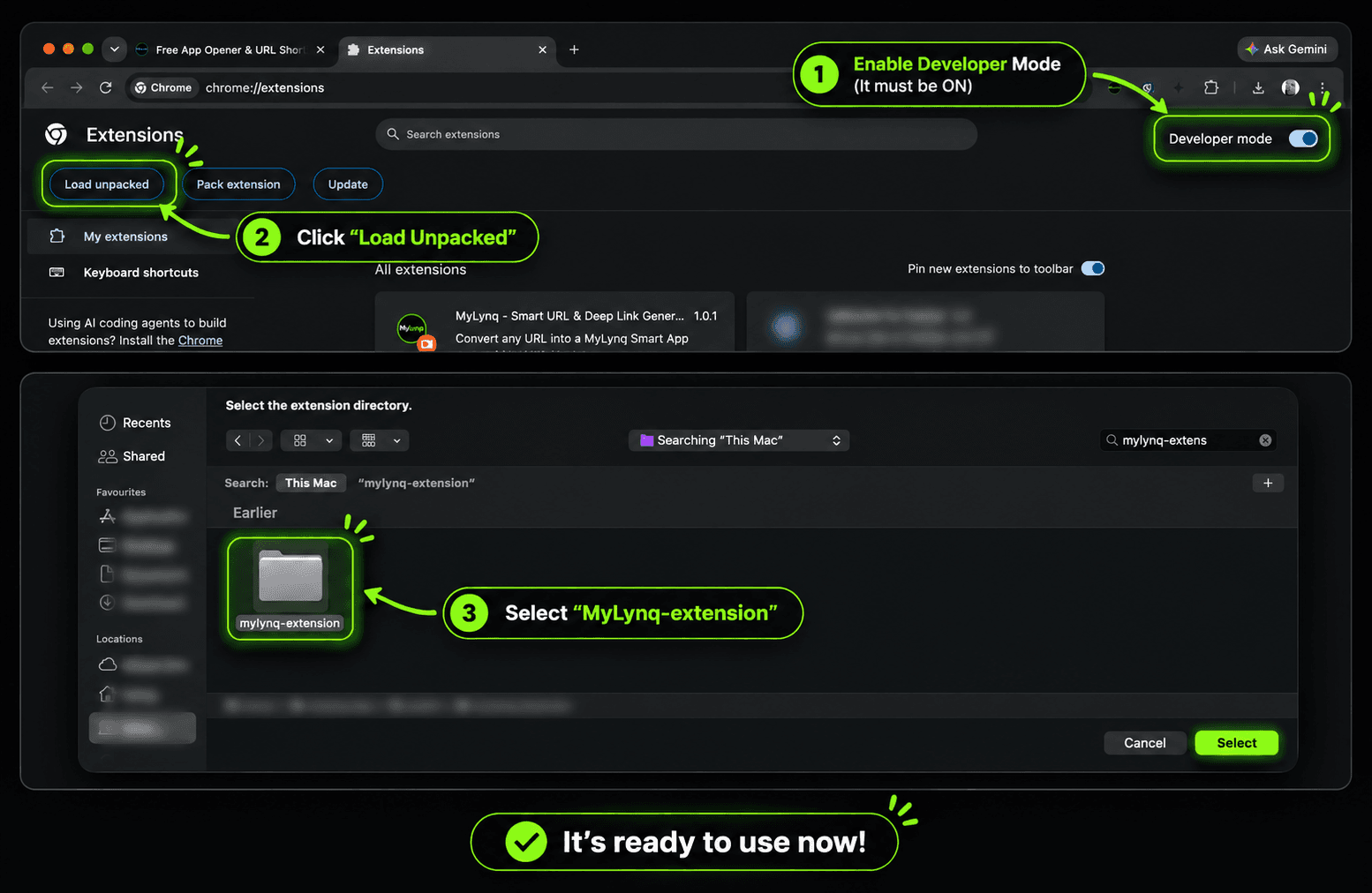
Open Extensions & Enable Developer Mode
Open Google Chrome (or any Chromium browser like Brave, Edge, or Arc). In the browser URL address bar, type:
Click "Load unpacked" and Select the Folder
Once Developer mode is enabled, new action buttons will appear in the top-left corner:
- Click the "Load unpacked" button in the top-left.
- In the file browser that pops up, select the extracted folder (named
mylynq-extension). - Click "Select Folder" (or "Open").
Pin Extension & Generate Your First Smart Link
To make it easily accessible with 1 click while browsing:
Key Features Included in the MyLynq Extension
Engineered for high-performing creators, marketers, and affiliate partners.
🎯 Direct App Opener
Bypasses Instagram & TikTok in-app browsers. Forces YouTube, Instagram, Amazon, and Spotify links to open directly inside native apps on iOS & Android.
🎨 Branded QR Generator
Every smart link includes a high-resolution QR code with a circular MyLynq center badge. Download in 1-click for flyers, videos, or packaging.
⚡ Zero-Login Cookie Sync
Logged in on mylynq.app? The extension automatically recognizes your account, pro status, and monthly limits with zero API keys required.
Works Across All Chromium Browsers
The MyLynq extension is built on Manifest V3 and is 100% compatible with:
Frequently Asked Questions
Yes, 100%. When you load an unpacked extension from MyLynq, you have complete visibility into the source code on your own machine. It runs standard Chrome Manifest V3 with minimal, secure permissions (activeTab and storage). It does not track your private browsing history or execute remote scripts.
We offer the official unpacked package directly to creators and beta users for instant access without waiting for third-party store approval cycles. It allows you to get new smart routing algorithms and app opener updates immediately.
Yes! Any Chromium-based browser supports Chrome extensions. In Brave, Edge, Opera, or Arc, simply navigate to the extensions management page (e.g. edge://extensions or brave://extensions), toggle Developer Mode, and click 'Load unpacked'.
Simply download the latest mylynq-extension.zip, unzip it to replace the folder on your computer, and click the circular 'Reload' (🔄) icon on your chrome://extensions page. Your settings and login session remain completely intact.
No. The extension is completely free for all users. Guest users can generate smart links immediately, and logging in with a free or Pro MyLynq account unlocks custom branded aliases, unlimited links, and click analytics.
Ready to boost your link click-through rate?
Join thousands of creators using MyLynq for smart deep linking and automation.